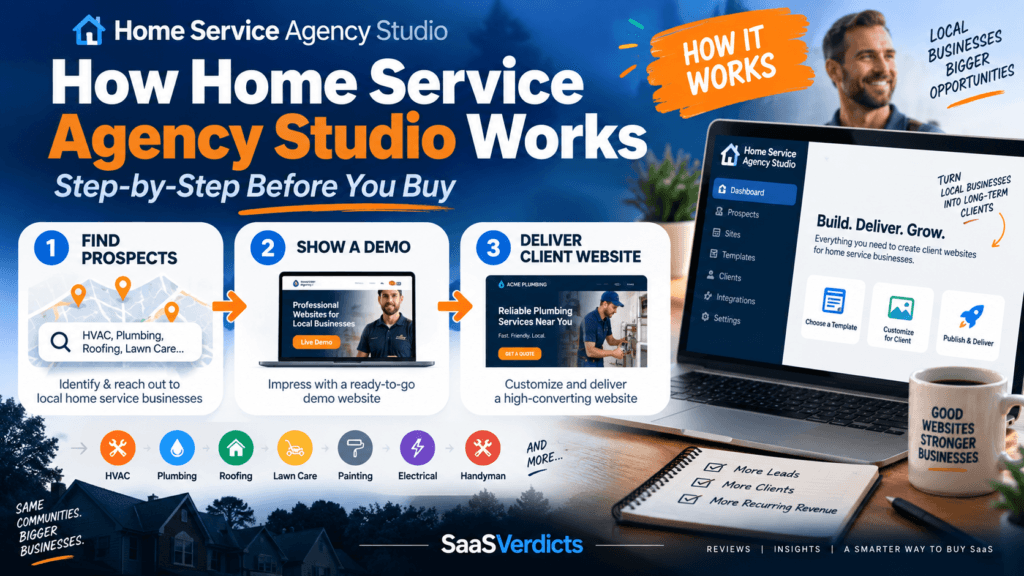
Home Service Agency Studio makes more sense when you stop looking at it as a bundle of templates and follow the prospect-to-client workflow. The product is built for local marketers who want to move from “this business needs a better website” to a relevant demo and then to a deliverable WordPress site without rebuilding every project from a blank install.
- Pick a home-service niche and website style.
- Prepare a prospect-focused demo around a real business.
- Use the visual demo to make outreach more concrete.
- Customize branding, services, contact details and quote elements after interest.
- Deliver the final WordPress site and optionally add maintenance, SEO or hosting services.
Step 1: Choose the niche before you touch the design
The core Studio starts with five website styles and ten home-service niche packs. That means you can begin from a structure already shaped around businesses such as plumbing, HVAC, roofing, landscaping and similar local services instead of researching every page from scratch. This matters because niche relevance is often more persuasive than visual novelty. A prospect is more likely to engage with a demo that already speaks the language of their service category.
Step 2: Build the demo around the prospect
The feature that creates the strongest sales curiosity is the demo workflow. Instead of emailing a portfolio and asking a business owner to imagine what you could build, you can prepare something that looks much closer to their future website. The product has been promoted around using real business information to personalize the prospect experience. The demo is not the finished client site; it is a sales asset designed to reduce the imagination gap.
Step 3: Use the demo to start a better sales conversation
Software cannot close the client for you. You still need prospecting, follow-up and a credible offer. But the workflow changes what you can lead with. Instead of “Do you need a website?”, the conversation can become “I mocked up a direction for your business—would you like to see it?” That is a much smaller commitment for the prospect and gives you a natural reason to discuss their current site, mobile experience, quote flow and local visibility.
Step 4: Convert the demo into a real client site
Once a prospect is interested, the prepared foundation becomes the starting point for delivery. You can refine the logo, colors, service details, locations, calls to action, contact data and other business-specific information. The five core styles are not meant to replace thoughtful customization; they are meant to remove repetitive setup. The better your final customization, the less the site feels like a template.
Step 5: Turn one website into a service relationship
The commercial opportunity becomes more interesting when the website is not treated as the end of the relationship. A local business may also need hosting, maintenance, local SEO, content updates, Google Business Profile support or conversion improvements. You do not need to sell all of those services, but a completed site can become the foundation for recurring work.
What Home Service Agency Studio does not automate
- Client acquisition: you still need to identify and contact prospects.
- Sales: a demo improves the conversation but does not guarantee a close.
- Quality control: niche content must still be checked and customized.
- Hosting and maintenance: normal WordPress responsibilities remain unless you buy a managed option.
- Unique positioning: you decide why the finished site is better for that specific business.
A practical seven-day test
- Day 1: choose one niche and identify five local prospects with weak websites.
- Day 2: install the Studio and learn one design style.
- Day 3: prepare one prospect-specific demo.
- Day 4: improve the headline, services and quote path.
- Day 5: send a short outreach message offering the demo.
- Day 6: follow up and record objections.
- Day 7: decide whether the workflow is fast enough to repeat.
See Home Service Agency Studio →
Frequently Asked Questions
Do I need to know WordPress?
Basic WordPress familiarity helps, although the product is designed to reduce the amount of building you do from scratch. You still need to understand domains, hosting, editing and client delivery.
Does it find clients automatically?
No. It gives you a stronger production and demonstration workflow; prospecting and sales remain your responsibility.
Can I use it for every local business niche?
The core offer is specifically built around home-service niches. Additional packs and expansion options broaden the range, but the strongest fit remains local service businesses.