In the span of three weeks this summer, Anthropic, OpenAI, and Microsoft each pushed a version of the same idea into general release: an AI agent you hand a whole project to, not just a prompt. Claude Cowork went to web and mobile on July 7. ChatGPT Work followed two days later, on July 9, bundled with GPT-5.6. Copilot Cowork had already reached general availability on June 16, moving Microsoft’s agent layer onto usage-based billing the same day.
That’s not a coincidence, and none of the three companies is pretending it is. Agentic AI — tools that plan, execute, and deliver a finished output rather than a draft — is the fight all three labs are having right now, and knowledge workers are the battleground. If you’re deciding which one deserves a seat in your workflow, the honest answer is: it depends less on which company you trust more, and more on where your work already lives.
This guide breaks down how each tool actually executes work, what it costs in 2026, where each one wins on real benchmarks, and which one fits your specific job — whether that’s a solo freelancer, a Microsoft-standardized enterprise, or a dev team shipping cod
The Quick Verdict
| If you’re… | Go with… |
|---|---|
| Already living inside Microsoft 365 (Outlook, Teams, Excel) | Copilot Cowork |
| Budget-conscious or just want to try an agent for free | ChatGPT Work |
| Working with local files, decks, or need heavy coding support | Claude Cowork |
| Running research or multi-site web tasks (booking, comparison shopping, data gathering) | ChatGPT Work |
| A developer or engineering team | Claude Cowork |
How Each Agent Actually Works (This Is the Part Marketing Pages Skip)
The three tools aren’t competing on the same axis. They’re built on genuinely different execution models, and understanding that difference matters more than any feature checklist.
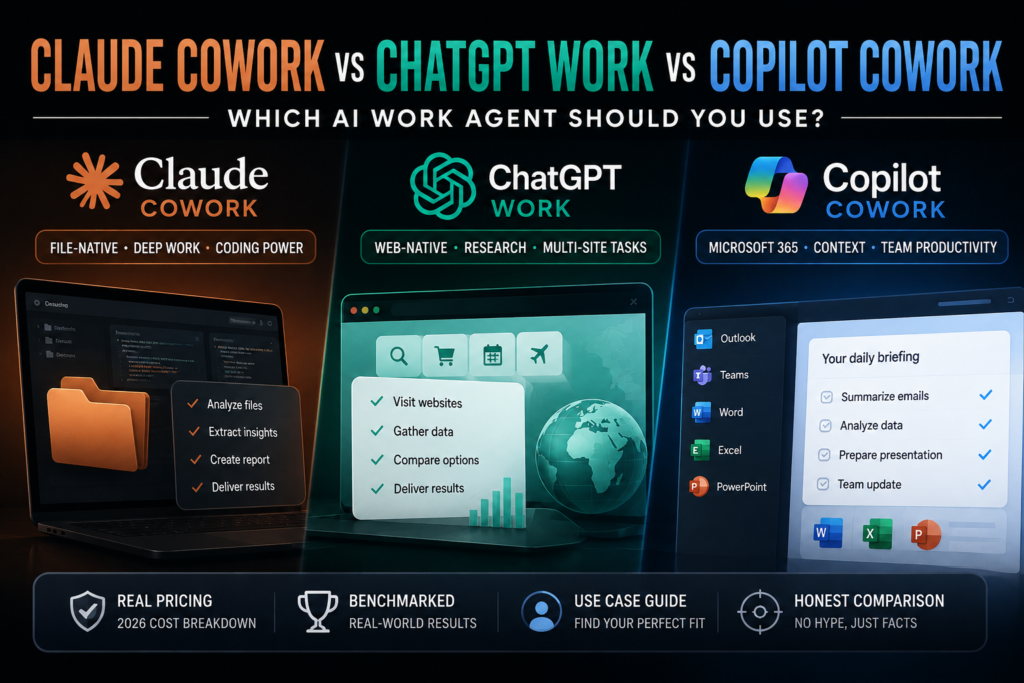
Claude Cowork: the desktop file-native agent
Claude Cowork runs on your desktop and operates directly on your local file system. You point it at a folder, describe the outcome you want, and it plans out the steps itself — reorganizing hundreds of files into a structured report, processing a batch of downloaded data, or assembling a presentation from raw source material. The tradeoff is that it needs the desktop app and local file access to do its best work, though it has since expanded to web and mobile for lighter tasks and monitoring.
ChatGPT Work: the browser-native operator
ChatGPT Work takes the opposite approach. It operates inside a virtual browser environment, navigating live websites, filling out forms, and taking actions across multiple sites before synthesizing the results into a finished deliverable. That makes it the stronger choice for research-heavy or web-native workflows — comparison shopping, gathering data scattered across several platforms, or booking and scheduling tasks — where the “work” genuinely lives on the open web rather than in a folder on your machine.
Copilot Cowork: the Microsoft 365-native orchestrator
Copilot Cowork is built to reason across the data you already generate inside Microsoft 365 — emails, Teams chats, meeting transcripts, and files — through Microsoft’s “Work IQ” context engine. Rather than asking you to describe a task from scratch, it pulls in your existing organizational context automatically. It ships with three pre-built agent roles (Researcher, Analyst, and Facilitator) plus the option to build custom agents, and it executes across Outlook, Teams, Word, Excel, and PowerPoint within Microsoft’s own security and governance perimeter.
The practical takeaway: Cowork excels at local file pipelines, ChatGPT Work excels at web-based, multi-site workflows, and Copilot Cowork excels when the entire job already lives inside the Microsoft 365 ecosystem. Choosing based on “which is smartest” misses the point — choose based on where your actual work sits.
Pricing Breakdown: What Each One Actually Costs in 2026
This is the section most comparison articles get wrong, because all three vendors structure pricing differently. Here’s the real cost stack for each.
Claude Cowork pricing
Cowork isn’t a separate product with its own price tag — it’s a capability built into the Claude desktop and web app, included on every paid Claude plan:
- Pro: ~$20/month (or ~$17/month billed annually) — the cheapest way to get full Cowork access
- Max 5x: ~$100/month — roughly 5x the usage allowance of Pro
- Max 20x: ~$200/month — roughly 20x the usage allowance of Pro
- Team and Enterprise: per-seat and custom pricing, with admin controls and compliance options
There is currently no free tier that includes Cowork. Worth knowing before you upgrade: Cowork tasks are agentic, meaning they involve multi-step reasoning, sub-agent coordination, and sometimes screenshots — which burns through your usage allowance noticeably faster than a normal chat conversation. If Cowork becomes central to your daily workflow, budget for Max, not Pro.
ChatGPT Work pricing
OpenAI took the opposite pricing strategy, rolling ChatGPT Work out with free-tier access as part of its push to compete on adoption rather than margin. That makes it the lowest-friction way to test whether an AI work agent fits your workflow at all, before committing budget to a paid tier elsewhere.
Copilot Cowork pricing
Copilot Cowork has the most complex cost structure of the three, and it’s worth understanding both layers before you roll it out to a team:
- Layer 1 — the seat: every user needs an existing Microsoft 365 Copilot license, roughly $30/user/month. This gets you into the interface but doesn’t include Cowork task execution.
- Layer 2 — usage: Cowork tasks are metered separately in Copilot Credits, priced at $0.01 per credit under pay-as-you-go, or a discounted prepaid tier for committed volume. Microsoft classifies tasks as light (~100–300 credits), medium (~400–700), or heavy (700+) depending on the models used, context retrieved, tools called, and runtime.
Admins manage this through a Cost Management dashboard in the Microsoft 365 admin center, with spending limits settable at the tenant, group, or individual level — a sign that Microsoft expects cost overruns to be a real concern at scale, not an edge case.
Benchmarks and Real-World Performance
Marketing pages are, unsurprisingly, not neutral on this. Microsoft’s own comparison page claims Claude Cowork created local files that introduced security risks and version sprawl, and failed to complete certain requested actions inside Outlook and Teams — a claim worth noting as Microsoft’s position, not an independent finding, given it appears on Microsoft’s own product page.
On coding specifically, independent benchmarking tells a clearer story: Claude holds a significant lead on real software-engineering tasks, scoring 80.3 versus 64.6 on SWE-Bench Pro against comparable OpenAI offerings. If your Cowork use case involves anything code-adjacent — debugging, reviewing pull requests, working across a codebase — that gap matters more than any UI comparison.
There’s also a notable cross-pollination worth flagging: Microsoft has moved toward a more model-agnostic strategy, and Anthropic’s own Opus model is now available inside Copilot Cowork itself. That blurs the “three-way rivalry” framing a little — in practice, Microsoft’s platform advantage and Anthropic’s model quality aren’t always on opposite sides of the table.
Which One Should You Actually Use? A Decision Framework
You’re a solo freelancer or small agency
Start with ChatGPT Work’s free access to see whether an agentic workflow tool earns a place in your stack at all. If your work is heavily file-based — client decks, reports, spreadsheets — Claude Cowork’s Pro tier at ~$20/month is a low-risk next step.
You’re a developer or engineering team
Claude Cowork is the stronger default given its lead on software-engineering benchmarks, and it pairs naturally with Claude Code if you’re already in that ecosystem.
You’re standardized on Microsoft 365
Copilot Cowork is the path of least resistance — it’s already reasoning over your Outlook, Teams, and Excel data without extra setup. Just model the cost carefully before rolling it out org-wide; the two-layer pricing (seat + credits) can surprise finance teams who budget for a flat per-seat cost.
Your work is research- or web-heavy
ChatGPT Work’s browser-native execution model is purpose-built for exactly this: gathering data across multiple sites, comparison research, and form-based tasks that live on the open web rather than in a local folder.
Frequently Asked Questions
Is Claude Cowork free?
No. Cowork requires at least a Claude Pro subscription (~$20/month). There is no permanent free tier that includes it.
Is ChatGPT Work free?
Yes, OpenAI has made ChatGPT Work available on free access as part of its rollout strategy, though usage limits apply.
Do I need a Microsoft 365 Copilot license to use Copilot Cowork?
Yes. Copilot Cowork sits on top of an existing Microsoft 365 Copilot license (~$30/user/month) and bills task execution separately in usage-based Copilot Credits.
Which tool is best for coding tasks?
Claude currently holds a clear lead on independent software-engineering benchmarks (SWE-Bench Pro), making Claude Cowork the stronger choice for code-heavy workflows.
Can I use more than one of these tools?
Yes, and many teams do — most organizations end up deploying multiple agent platforms based on which team or workflow each one fits best, rather than standardizing on a single vendor.
The Bottom Line
None of these three tools is objectively “the best AI work agent” — that framing misunderstands what happened this summer. Anthropic, OpenAI, and Microsoft didn’t build competing versions of the same product; they built three different bets on where knowledge work actually happens. Claude Cowork bets on your local files. ChatGPT Work bets on the open web. Copilot Cowork bets on the fact that your work already lives inside Microsoft 365.
The right move for most people isn’t picking a side — it’s matching the tool to the job in front of you. And given how fast this category is moving (three major launches in under a month, mid-launch pricing changes, and models already crossing over between platforms), treat any comparison — including this one — as a snapshot, not a permanent verdict. We’ll be updating this page as pricing and features change.
Last updated August 2, 2026. Pricing and features for all three tools change frequently — always confirm current details on each provider’s official pricing page before making a purchasing decision.